General Settings
General Settings centralize key configurations that apply to your entire project. From here, you can upload a favicon and webclip icon to ensure consistent branding across browsers and devices, generate a clone link to duplicate or share the project setup, and enable the accessibility widget to improve usability for a wider audience. These global options help maintain brand consistency, streamline collaboration, and enhance overall user experience across the site.
Project Settings
CMS
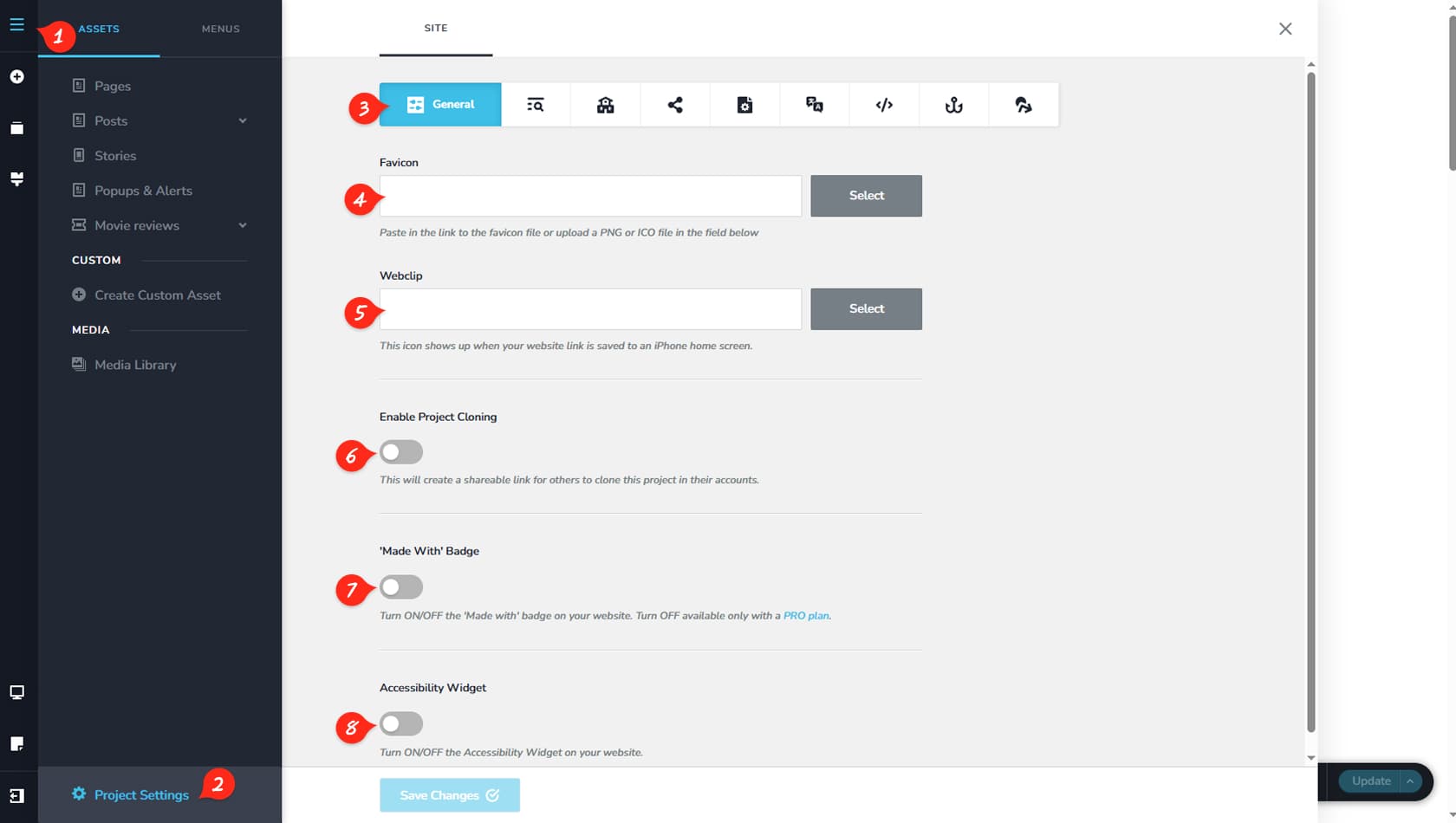
To access Project Settings, first click the CMS icon in the builder interface.
Project Settings
Then select Project Settings from the panel that opens.
General Tab
Open the General tab, which is selected by default.
Favicon
Here you can upload a favicon for your project.
Webclip
This option allows you to add a webclip icon.
Project Cloning
Here you can generate a clone link for the project. Copy the link and paste it into your workspace to duplicate the project there.
Made With
This setting enables you to display a “Made With” badge.
Accessibility
Here you can enable or disable the Accessibility widget. The Accessibility feature enhances usability by offering tools that assist users with visual, motor, or cognitive challenges in navigating and interacting with your website more easily.